AureoEyes English Version1.0
Publisher Description
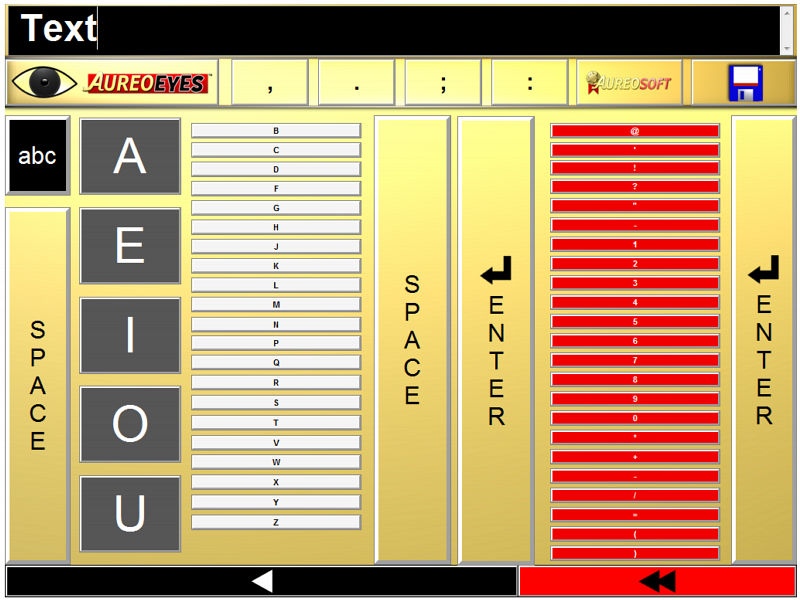
AureoEyes is a free virtual keyboard that has been specially developed for visually impaired and blind people. AureoEyes makes it easier for those people to write texts using just a computer with a sound card. AureoEyes has a very fast learning curve and can be used by almost anyone without a toilsome training.
AureoEyes allows the user to write and save text using the program's innovative and very friendly design coupled with respective sound cues.
AureoEyes' technology was developed by physicians and PhD researchers at AureoSoft ("On-screen sliding keyboard" or OSSK technology).
AureoEyes main concept is based upon the fact that all letters, numbers and symbols can be accessible using a mouse that slides over a logically organized sequence of keys. Whenever the mouse hovers a key (letter, number or symbol), it is spoken aloud clearly. In order to confirm the key you are over, just click the right mouse button, and the sound is repeated immediately without being entered in the text. In order to enter the desired key in your text just click the left mouse button to confirm.
AureoEyes software runs in full screen mode in order to facilitate user navigation. Vowels are located on large keys that serve as reference points on the left-side of the screen. Space and Enter keys serve as guideposts and boundaries for different keyboard areas. All letters, diacritical accents (for non-English versions), numbers, symbols and editing keys can be easily accessible using those reference points.
AureoEyes allows the user to save text files that are named sequentially according to the current date of edition, so that they can be easily organized and printed later.
In association with clipboard reader applications, AureoEyes allows for reading aloud the edited text.
AureoEyes is freeware for home users.
About AureoEyes English Version
This Health & Nutrition program is available in English. It was last updated on 29 September, 2026. AureoEyes English Version is compatible with the following operating systems: Windows.
The company that develops AureoEyes English Version is AureoSoft. The latest version released by its developer is 1.0. This version was rated by 4 users of our site and has an average rating of 4.3.
The download we have available for AureoEyes English Version has a file size of 8.4 MB. Just click the green Download button above to start the downloading process. The program is listed on our website since 2010-12-22 and was downloaded 255 times. We have already checked if the download link is safe, however for your own protection we recommend that you scan the downloaded software with your antivirus. Your antivirus may detect the AureoEyes English Version as malware if the download link is broken.
How to install AureoEyes English Version on your Windows device:
- Click on the Download button on our website. This will start the download from the website of the developer.
- Once the AureoEyes English Version is downloaded click on it to start the setup process (assuming you are on a desktop computer).
- When the installation is finished you should be able to see and run the program.
Program Details
System requirements
Download information
Pricing
Version History
version 1.0
posted on 2010-12-22
New Release
